
Sites
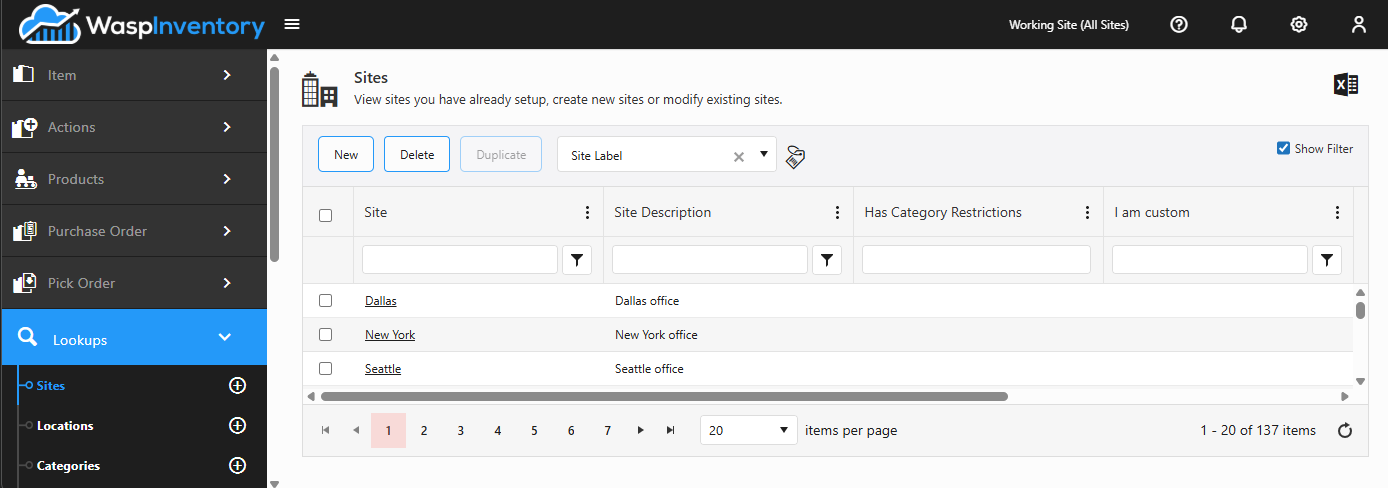
A site is a physical building or warehouse where your stock lives. Everything you track sits at a location within a site, so your sites are usually the first lookup you set up.
Before you begin
Section titled “Before you begin”- You need a role that allows managing sites. If the New button is missing, ask your administrator to check your role.
- Set up your sites before you create locations: every location has to belong to a site, so the site needs to exist first.
View your sites
Section titled “View your sites”Open Lookups → Sites to see the list of every site you’ve created. Click any site in the list to open it and review or edit its details.
Add a site
Section titled “Add a site”- From the Sites list, click New.
- Enter a Site Name. This is the required field, and it’s how the site appears everywhere else in the app (in the Working Site selector, on items, on orders). Choose a name your team will recognize at a glance.
- Optionally add a Description for a little more detail, and any Notes to record background your team might need later. Notes are kept as a running history.
- Fill in any custom fields your administrator has added.
- Click Save.
Edit a site
Section titled “Edit a site”- Open the site from the Sites list.
- Update the name, description, notes, or any custom fields.
- Click Save.
Custom fields
Section titled “Custom fields”If your administrator has set up custom fields for sites, they appear on the site form alongside the built-in fields. Use them to capture extra details specific to your business, such as a region, a manager, or a building code.
How the Working Site selector relates
Section titled “How the Working Site selector relates”At the top of the app you’ll find the Working Site selector. It scopes what you’re looking at to a single site, or to All Sites, so you only see the stock and activity that matter to you right now. The sites you create here are exactly the choices that appear in that selector.
Troubleshooting
Section titled “Troubleshooting”- I can’t delete a site. A site that still holds stock, or that has locations or history attached to it, can’t be removed. Deleting it would strip the record of where that inventory lived. Move or remove the stock and its locations first, or simply rename the site if you’ve stopped using it.
- My new site isn’t in the Working Site selector. The selector refreshes when you reload the app. If a freshly created site is missing, refresh the page, and confirm the site was actually saved (it should appear in the Sites list).
- Users can’t see a site’s stock. In some setups a user’s role restricts which sites they can access. If a teammate can’t find a site, check their role and site restrictions with your administrator.
Related
Section titled “Related”- Locations & zones — the spots within each site
- The interface — how the Working Site selector works
- Lookups overview