
Customers
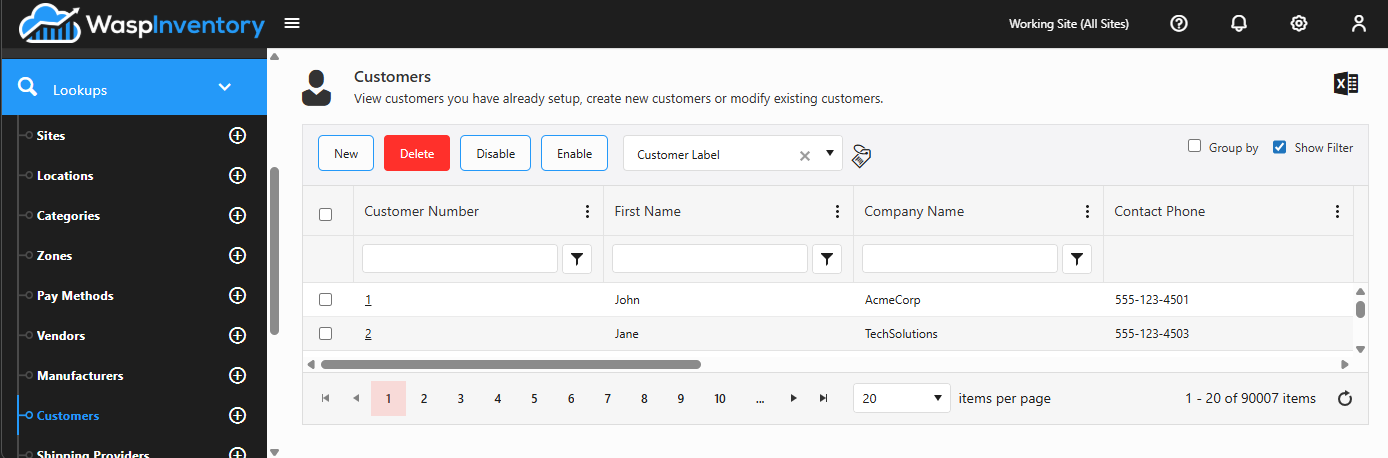
A customer is a person or company you sell or ship to. Customers are the “sell” side of your inventory: when you create a Pick Order, you choose the customer you’re fulfilling it for.
Before you begin
Section titled “Before you begin”- You need a role that allows managing customers. If New is missing, ask your administrator to check your role.
- If you want customer numbers assigned automatically, set that up first under Number series.
- Setting a default Ship Via or Payment method saves a step on every order, so it helps to have your Shipping Providers and Pay Methods in place first.
View your customers
Section titled “View your customers”Open Lookups → Customers to see the list of customers you’ve created. Click any customer to open its details.
Add a customer
Section titled “Add a customer”- From the Customers list, click New.
- Enter a Customer Number. If your system is set to assign numbers automatically, this fills in for you when you save.
- Enter the customer’s First Name and Last Name, and a Company Name and Department if relevant.
- Fill in Business Details: phone, email, fax, and website.
- Choose a default Ship Via (shipping method) and default Payment method if this customer usually uses the same ones.
- Add a Contact and one or more addresses.
- Click Save.
Edit a customer
Section titled “Edit a customer”Open the customer from the list, use the edit (pencil) controls on each card to change its details, contacts, or addresses, and Save.
Addresses and defaults
Section titled “Addresses and defaults”- Addresses — add as many as you need and label each by type (for example, billing or shipping). These are available when you raise a pick order.
- Default Ship Via — the shipping method that’s pre-selected on new orders for this customer. The choices come from your Shipping Providers.
- Default payment method — the payment terms pre-selected on new orders. The choices come from your Pay Methods.
Custom fields
Section titled “Custom fields”If your administrator has set up custom fields for customers, they appear on the customer form so you can capture extra details specific to your business.
Troubleshooting
Section titled “Troubleshooting”- The Customer Number field is empty and won’t let me type. Your system assigns customer numbers automatically. Leave it blank; the number is generated on save. Change this under Number series.
- The Ship Via or Payment drop-down is empty. You haven’t set up those lists yet. Add carriers under Shipping Providers and terms under Pay Methods.
- I can’t delete a customer. A customer referenced by a pick order can’t be removed, since that would break the order’s history. Leave the record in place or rename it if it’s no longer active.
Related
Section titled “Related”- Pick orders — where customers are used
- Shipping providers, pay methods & adjust reasons — the Ship Via and Payment choices
- Number series — automatic customer numbering
- Lookups overview