
Manufacturers
A manufacturer is the company that makes an item you stock. Keeping manufacturer records lets you tie items back to who produces them and gives you a place to store the maker’s contact details.
Before you begin
Section titled “Before you begin”- You need a role that allows managing manufacturers. If New is missing, check your role with your administrator.
- A manufacturer is who makes an item; a vendor is who you buy it from. If you’re setting up purchasing, you probably want vendors too.
View your manufacturers
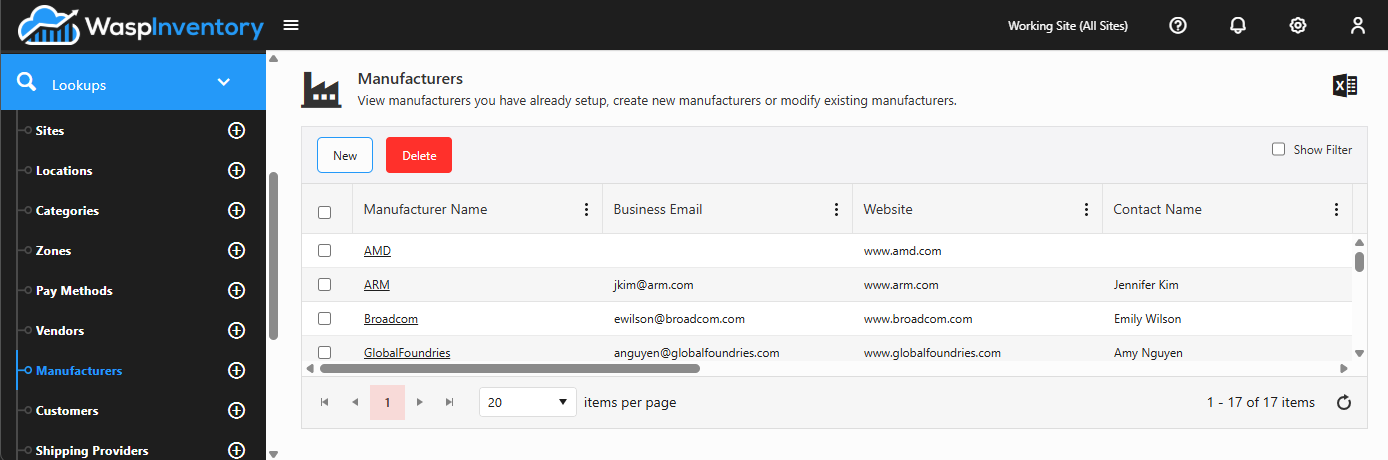
Section titled “View your manufacturers”Open Lookups → Manufacturers to see the list of manufacturers you’ve created. Click any one to open its details.
Add a manufacturer
Section titled “Add a manufacturer”- From the Manufacturers list, click New.
- Enter the Manufacturer Name.
- Fill in Business Details if you have them: phone, email, fax, and website.
- Add a Contact (name, phone, cell, fax, and email) for your day-to-day point of contact.
- Add one or more addresses.
- Click Save.
Edit a manufacturer
Section titled “Edit a manufacturer”Open the manufacturer from the list, use the edit (pencil) controls to update the business details, contact, or addresses, and Save your changes.
Custom fields
Section titled “Custom fields”If your administrator has set up custom fields for manufacturers, they appear on the manufacturer form so you can capture extra information (such as an account number or a support portal) that’s specific to your business.
Troubleshooting
Section titled “Troubleshooting”- My edit didn’t save. The business details, contact, and address sections each have their own edit (pencil) control. Make sure you’ve confirmed the change in the section you were editing before clicking Save on the record.
- I can’t delete a manufacturer. A manufacturer that’s still linked to items generally can’t be removed. Clear the manufacturer from those items first, or leave the record in place and stop using it.
Related
Section titled “Related”- Vendors — the companies you buy from
- Creating an item — link an item to its manufacturer
- Custom fields — add your own fields to this form
- Lookups overview